- ¿What is the Evaluation Evolution that begins in Summer 2025?
-
The Evaluation Evolution that begins in Summer 2025 is defined primarily by a distinction between Training Units. Starting this academic term, only certain Training Units will record in eLumen the level of achievement reached by students in each subcompetency.
This distinction does not imply changes to the Training Unit's evaluation plan. Instead, it represents a high-level shift related to each academic program's curricular pathway.
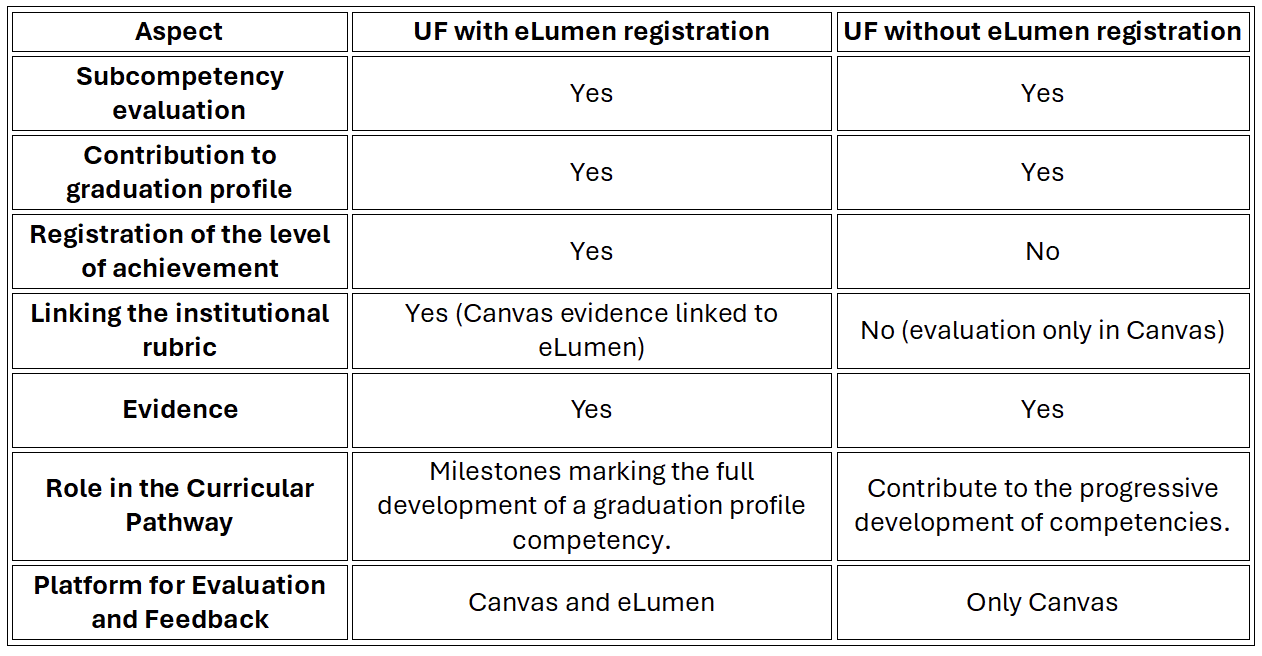
The Training Unit that registers the level of achievement of a subcompetency in eLumen represents milestones in the student’s curricular journey—moments where key graduation profile learnings are integrated and the full development of a competency is achieved. These Training Units will continue linking the evidence in Canvas with the institutional rubric for the relevant subcompetencies in eLumen.
Although only some Training Units will record achievement levels in eLumen, it is essential to emphasize that all Training Units continue to develop and assess subcompetencies and contribute to the graduation profile. Training Units that do not record the level of achievement in eLumen will conduct both the evaluation and feedback process exclusively in Canvas.
The following diagram summarizes the characteristics of the evaluation process starting in Summer 2025:
- When will the Evaluation Evolution begin?
- This evolution will begin in Summer 2025 for all Training Units in the 2019 curricula.
- How can I know whether my Training Unit evaluates and provides feedback on evidence in Canvas or eLumen?
-
There are several ways to identify the platform where you will evaluate evidence for your Training Unit (UF):
1. From Canvas: In the course corresponding to your UF, go to the Evaluation Plan section on the Home page. There you will find a note following the evidence section that indicates the platform used for evaluation:
· If the UF evaluates in Canvas:
““Note: The evaluation and feedback of the evidence are carried out in Canvas.”
· If the UF evaluates in eLumen:
““Note: Feedback on the evidence and the level of achievement for each subcompetency is provided in eLumen.”
These notes also appear at the beginning of each evidence item.
2. Through Atenea: Log in to Ateneaand search for your Training Unit (UF) using its course code. In the Indicator column, you can identify the type of UF based on the color:
o Azul: Training Units that evaluate, provide feedback on evidence, and record the level of achievement in eLumen.
o Purple: Training Units that evaluate and provide feedback on evidence in Canvas.
3. In the Training Unit Purpose Dashboard:Check the Dashboard Tablero de Propósito de UF. The last column, titled “Evaluation Platform,” specifies the platform for evaluating the evidence.
- If my Training Unit indicates that evidence is evaluated in Canvas, does that mean I no longer develop or assess subcompetencies?
-
All Training Units will continue to develop and assess subcompetencies. The key difference is that, starting in Summer 2025, only some Training Units will record students' level of achievement in eLumen.
It is essential to understand and uphold the commitment that all Training Units must include integrative evidence in their evaluation plans to enable the assessment of the subcompetencies being developed.
Providing feedback on subcompetency performance in every Training Unit is crucial, as it helps students improve and prepare to demonstrate those sub-competencies in future Training Units, where the level of achievement will be officially recorded in eLumen.
- Are subcompetency evidence items no longer required in Training Units that evaluate in Canvas?
-
Yes, they are still required. We continue to follow a competency-based educational model, meaning evidence remains essential.
These evidence items allow students to demonstrate subcompetencies through products or performances integrating knowledge, skills, and attitudes. Additionally, they form part of the final grade in the course.
- How can I determine the numerical grade for evidence when evaluating in Canvas?
-
The numerical grade is determined using specific evaluation criteria for each piece of evidence, organized within an assessment instrument, such as a rubric, checklist, or observation guide.
Each criterion in the instrument is weighted, and a numerical score is assigned based on the student’s performance.
In addition to this evidence-specific instrument, the institutional rubric for the sub-competency must also be used. This rubric allows you to evaluate the level of achievement the student has reached for the sub-competency and remains a key reference in the assessment process.
- Should I still use the institutional rubric to assess the evidence if my Training Unit is evaluated in Canvas?
-
Yes. Evidence is used to demonstrate subcompetencies; therefore, each institutional rubric should be used to assess the corresponding level of achievement.
Even if the level of achievement is not recorded in eLumen, the rubric must still be applied to guide the evaluation and provide meaningful feedback to the student.
In addition, it's essential to define specific evaluation criteria for each piece of evidence.
Keep in mind that providing feedback on subcompetency performance is essential. Feedback should be individualized, authentic, and meaningful, helping students understand their progress and areas for improvement.